State Data Management System (SDMS) User Guide
This website provides instructions for how to use the State Data Management System (SDMS).
For state accountability administrations, schools and districts don't place orders for the SAT Suite of Assessments through College Board's SAT Suite Ordering and Registration (SSOR) system. Instead, students are registered for their spring state assessments via SDMS.
Depending on permissions assigned by their state department of education, district assessment coordinators (DACs), school test coordinators, and Services for Students with Disabilities (SSD) coordinators may use SDMS to upload student data, view student rosters, waive accommodations, and/or "force match" a student's accommodations if necessary.
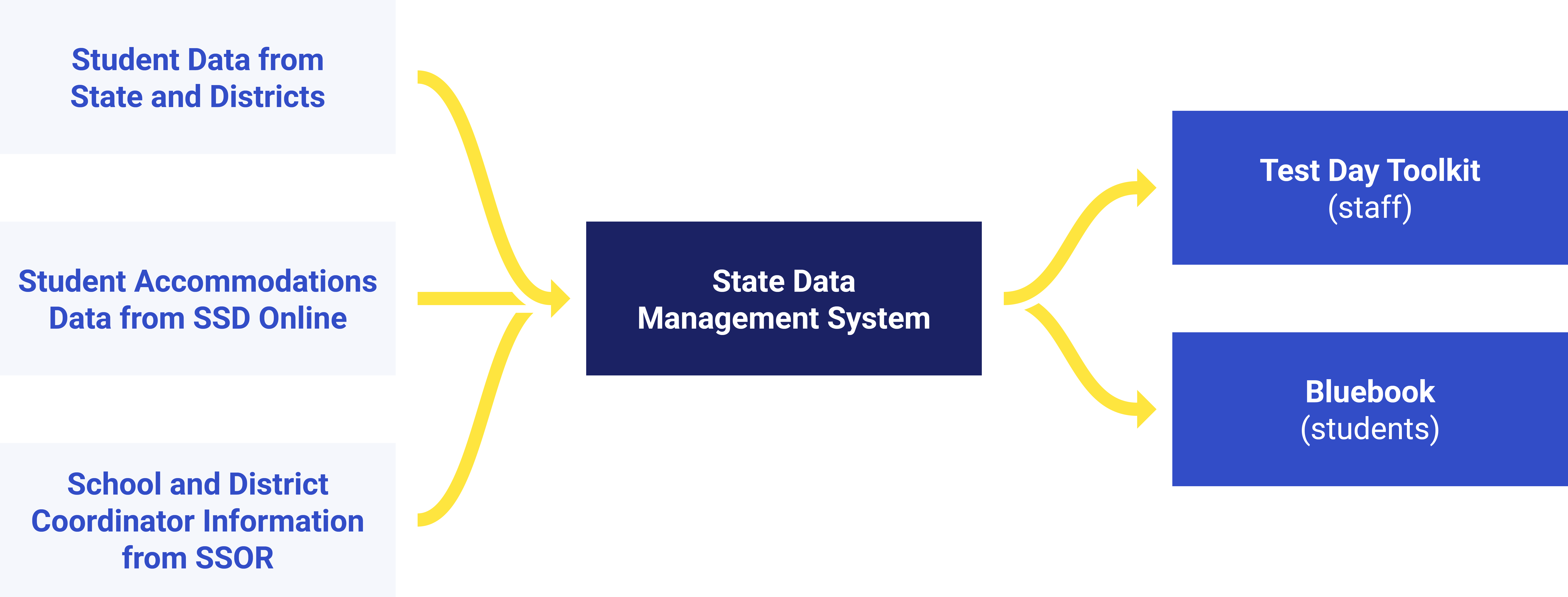
SDMS is part of a network of interconnected systems that handles student data. SDMS takes in student data from districts and states in addition to staff data from SSOR and accommodations data from SSD Online. This data then generates the appropriate rosters in Test Day Toolkit and test packages in Bluebook for test day.
The diagram below shows the flow of data to and from SDMS.
Your SDMS experience will vary depending on what state you're administering the SAT Suite in. Each of the SDMS features listed on this page include which states they apply to. Read the sections that correspond to your state's SDMS experience.