Waiving Accommodations
Students can waive all or some of their approved accommodations for spring SAT School Day, PSAT 10, or PSAT 8/9 testing.
NOTE: Waiving accommodations for spring testing in SDMS does not affect the student's SSD Online profile.
Here's an example of a scenario that includes waiving accommodations:
- A student is approved for extra breaks and up to time and one-half. After a conversation with the student and their family, the student decides that they just want the extra breaks with standard time for SAT School Day. The SSD coordinator logs the conversation locally via their own process.
- The coordinator then logs into SDMS and waives the up to time and one-half accommodation for this student's SAT School Day registration. The test package is reprovisioned within one business day, and when the student logs into Bluebook to take the SAT, they'll only see extra breaks as their approved accommodation.
- The student still has extra breaks and up to time and one-half approved in SSD Online for all other College Board tests, such as AP exams and future assessments in the SAT Suite.
To waive a student's accommodations, log in to SDMS and find the student by searching for their name or student ID in the Student Roster or Manage Students > Edit Student pages.
Expand the student profile and use the toggle buttons next to the accommodations to waive the accommodations.
Click the blue Save button to apply the change.
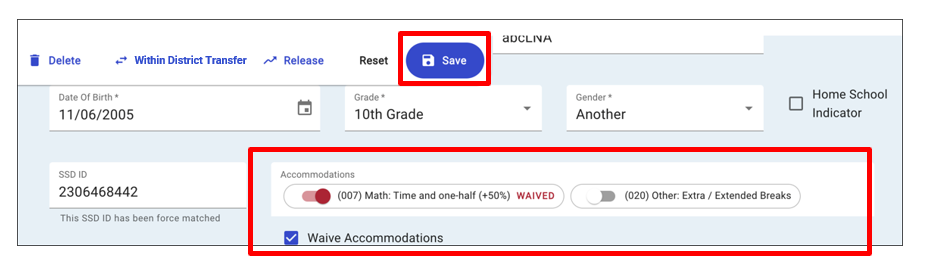
NOTE: If a student changes their mind, you can use the toggle button to reinstate that accommodation for a spring assessment. It takes up to one business day to re-provision a test package into Bluebook.